Table of Contents
In the previous articles, we moved from simple agents to tools, dependency injection, and structured output. Now, the agent can already do useful work inside an application. But it still depends on the capabilities you explicitly wire into that application. That is fine for domain logic you own. It’s less attractive when the capability already exists somewhere else: a file system, a documentation server, an internal workflow system, or a set of reusable team procedures.
Two extension models become interesting:
- MCP tools connect an agent to external capabilities through the Model Context Protocol.
- Agent Skills package reusable instructions, resources, and scripts that an agent can load only when needed.
Both models extend agent capabilities, though they address different needs. They solve different problems.
MCP Is for External Capabilities
Model Context Protocol is useful when the agent needs to interact with a system outside your application boundary. Instead of writing a custom C# wrapper for every external API, you connect to an MCP server and expose the tools from that server to the agent. The server owns the integration logic. Your application decides whether that server is allowed into the agent runtime.
MCP can expose more than tools, including resources and prompts, depending on the server and client. This article focuses on MCP tools because they are the most direct fit for agent tool calling in this part of the series. Conceptually, the flow looks like this:
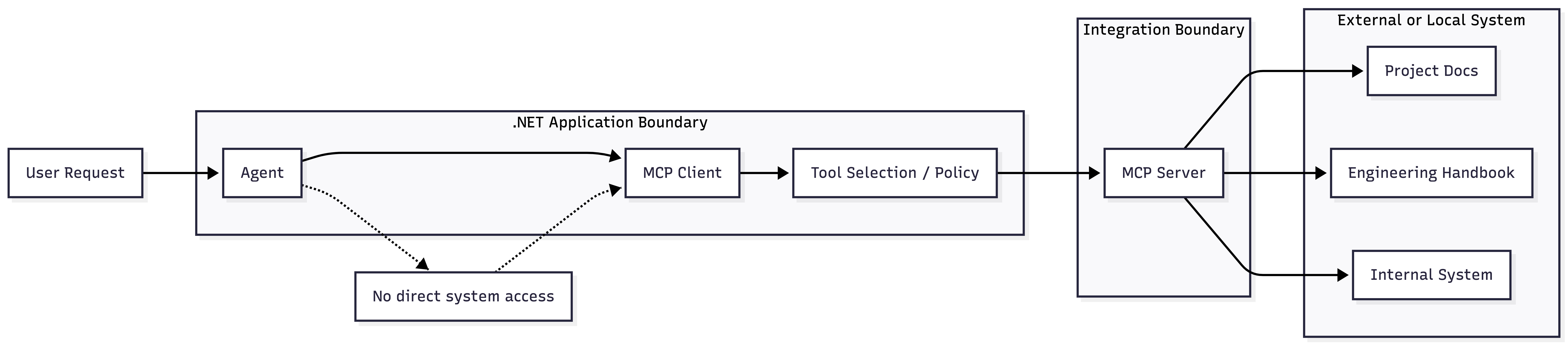
Microsoft Agent Framework can work with the official MCP C# SDK. A typical setup starts by creating an MCP client, listing the tools exposed by the server, and passing those tools to the agent. For example, imagine a local read-only documentation MCP server that exposes project docs and an engineering handbook. The exact command depends on the MCP server you use or build. The important part is that the server is configured as read-only before its tools are exposed to the model.
using Microsoft.Agents.AI;
using Microsoft.Extensions.AI;
using ModelContextProtocol.Client;

await using var mcpClient = await McpClientFactory.CreateAsync(
    new StdioClientTransport(new()
    {
        Name = "EngineeringDocs",
        Command = "dotnet",
        Arguments =
        [
            "run",
            "--project",
            "./tools/DocsMcpServer",
            "--",
            "--root", "./docs",
            "--root", "./engineering-handbook",
            "--read-only"
        ]
    }));

var mcpTools = await mcpClient.ListToolsAsync();

AIAgent agent = chatClient.AsAIAgent(
    instructions: """
    You answer questions about this project's engineering documentation.
    Use the documentation tools when current project guidance is needed.
    """,
    tools: [.. mcpTools.Cast<AITool>()]);
The DocsMcpServer name in this example is intentionally generic.
It could be your own small MCP server, an approved internal server, or a stable server package your team has reviewed.
The point is the MCP boundary.
The agent does not know how to read the documentation store directly. It sees a set of tool definitions exposed by the MCP server. When the model chooses one of those tools, your application routes the call through the MCP client.
MCP avoids hand-written custom API wrappers for every external system, but it does not remove application code. You still own client setup, authentication, tool discovery, tool selection, logging, and safety boundaries.
MCP Is Still a Trust Boundary
MCP makes integrations easier. It does not make them automatically safe. An MCP server can expose powerful operations:
- searching document stores
- reading internal handbooks
- creating tickets
- changing files
- querying databases
- calling internal APIs
- accessing local files
- executing commands, depending on the server
So treat an MCP server like any other integration dependency. Do not connect random servers to production agents, and do not assume that the protocol itself is the safety layer. At minimum, check:
- Who maintains the server
- What tools does it expose
- What credentials it receives
- What data leaves your application
- Whether tool calls are logged
- Whether write operations need approval
- Whether the server runs locally, remotely, or inside a sandbox
Authentication also belongs outside the prompt. Do not put API keys, personal access tokens, or OAuth tokens into agent instructions. Use the authentication mechanism expected by the MCP server and transport. For remote HTTP servers, prefer per-run headers or runtime credential providers when available, so secrets are not baked into a shared client or accidentally persisted.
Keep the MCP Tool Surface Small
MCP servers can expose many tools. That does not mean every agent should receive all of them. A large tool surface creates three practical problems:
- More tool descriptions are sent to the model, increasing token usage.
- The model has more opportunities to choose the wrong tool.
- Your review surface grows because every exposed tool becomes callable through the agent.
The same rule from local function tools applies here:
Expose the narrowest capability set that solves the task.
Prefer filtering before the tools ever reach the model. Client-side filtering is useful, but it should not be the only safety boundary. If the MCP server supports read-only mode, toolsets, scopes, explicit tool configuration, or server-side restrictions, use those first. That keeps dangerous operations entirely out of the advertised tool list.
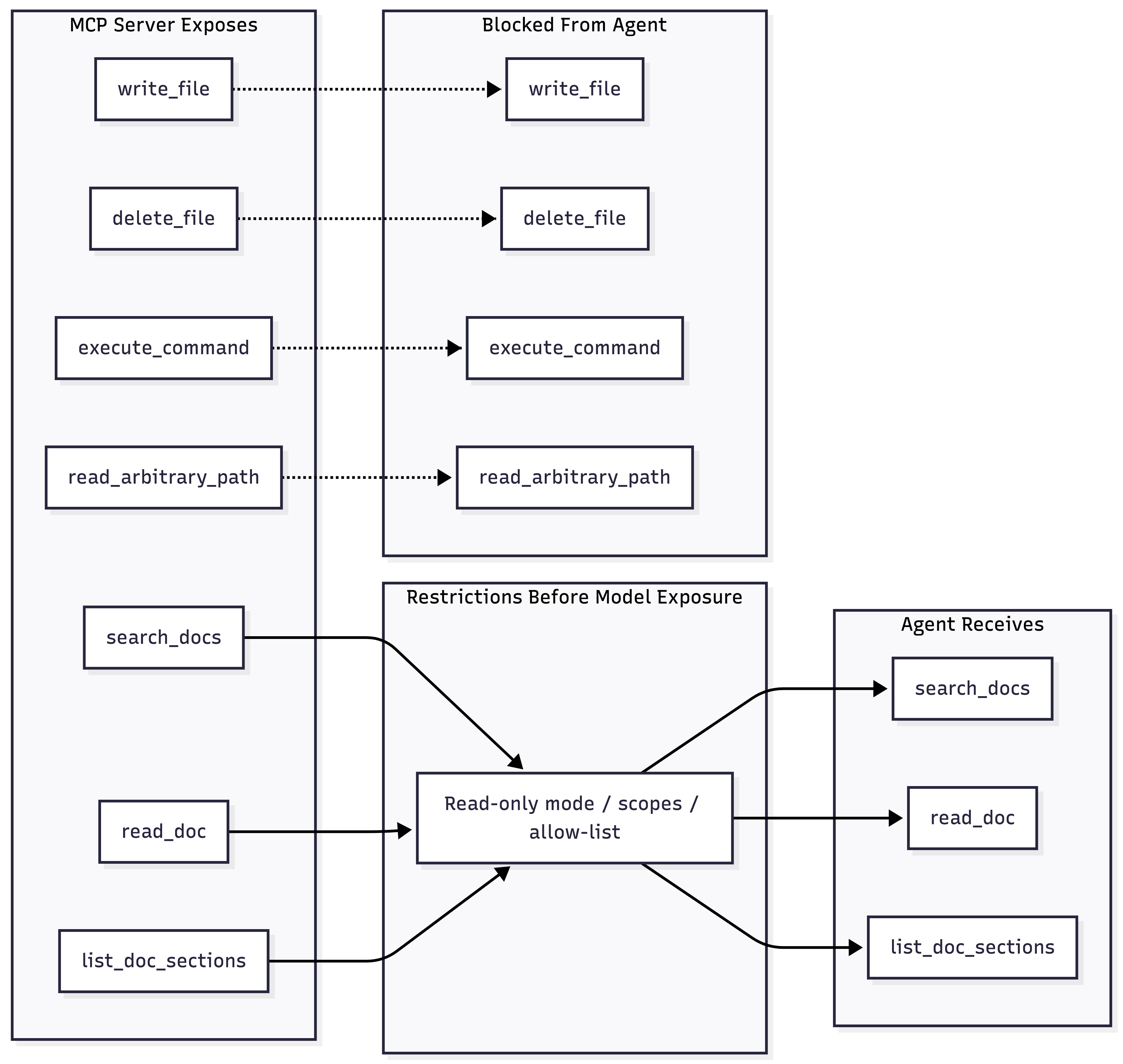
For example, a documentation assistant may need tools that search docs, read files under approved directories, or return links to handbook pages. It should not receive tools that write files, shell out to the host, or read arbitrary paths outside the configured documentation roots.
Client-side allow-listing can be a second boundary after the server has already been configured safely. Use explicit configuration or metadata when possible.
This name-based example is illustrative only:
var allowedToolNames = new HashSet<string>(StringComparer.OrdinalIgnoreCase)
{
    "search_docs",
    "read_doc",
    "list_doc_sections"
};

var selectedTools = mcpTools
    .Where(tool => allowedToolNames.Contains(tool.Name))
    .Cast<AITool>()
    .ToArray();

AIAgent docsAgent = chatClient.AsAIAgent(
    instructions: "Use only the approved documentation tools.",
    tools: selectedTools);
Do not treat naming conventions as a production security model. They are too easy to get wrong. In a real system, prefer server-side restrictions, explicit allow-lists, scopes, policy configuration, and audit logs. Expose tools intentionally to ensure agent access stays controlled.
Agent Skills Are for Reusable Knowledge and Procedures
MCP is a good fit when the agent needs to call an external system. Agent Skills are a better fit when the agent needs reusable knowledge or a repeatable procedure.
Agent Framework can support file-based skills and other authoring styles, such as code-defined or class-based skills. This article focuses on the file-based Agent Skills format because it maps well to reusable instructions, reference material, and scripts.
In the file-based Agent Skills format, a skill is a folder with a SKILL.md file and optional resources.
For example:
skills/
  incident-triage/
    SKILL.md
    references/
      severity-levels.md
      escalation-policy.md
    scripts/
      summarize-logs.py
  pull-request-review/
    SKILL.md
The SKILL.md file contains front matter and instructions:
---
name: incident-triage
description: Guides incident triage, severity classification, escalation, and concise incident summaries.
---

# Incident Triage

Use this skill when the user asks for help with a production incident,
alert investigation, severity classification, escalation, or incident summary.

When triaging an incident:

1. Identify affected services, users, and time window.
2. Classify severity using `references/severity-levels.md`.
3. Check escalation rules in `references/escalation-policy.md`.
4. Summarize known facts, unknowns, impact, and next actions.
5. Use `scripts/summarize-logs.py` only when log excerpts need deterministic preprocessing.
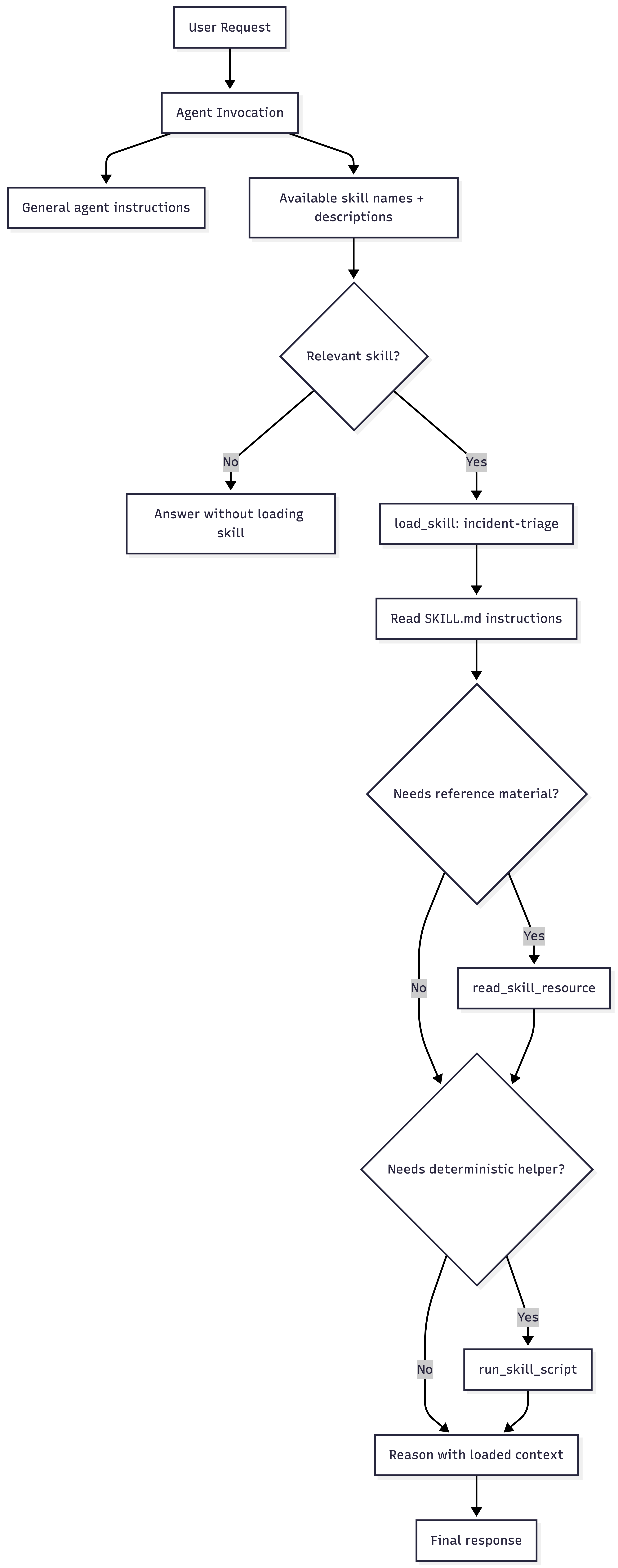
This is different from putting all of that text into the agent’s system prompt. The skill can be advertised by name and description first. The full instructions and reference files are loaded only when the task needs them. That keeps the base prompt smaller while still giving the agent access to deeper domain knowledge.
Loading Skills in Agent Framework
Agent Framework exposes Agent Skills through an AgentSkillsProvider.
It acts as an AIContextProvider, so skills become part of the agent invocation pipeline rather than a one-off prompt trick.
A simple file-based setup looks like this:
using Microsoft.Agents.AI;

var skillsProvider = new AgentSkillsProvider(
    Path.Combine(AppContext.BaseDirectory, "skills"));

var agentOptions = new ChatClientAgentOptions
{
    ChatOptions = new()
    {
        Instructions = """
        You help engineers triage incidents and follow internal procedures.
        Use available skills when they are relevant.
        """
    },
    AIContextProviders = [skillsProvider]
};

AIAgent agent = chatClient.AsAIAgent(agentOptions);
The provider discovers skills from the configured directory and exposes skill-related tools to the agent. The model can then load the right skill when a user request matches the skill description.
This gives you a useful separation:
- The agent instructions define the general behavior.
- Skills provide specialized procedures and checklists.
- Reference files hold longer policy or domain material.
- Scripts can automate deterministic helper steps when you explicitly enable them.
Scripts Need Even More Care
Skills can include scripts. That is useful, but it changes the risk profile. Reading a markdown reference file is one thing. Executing a script is another. If you enable file-based script execution, do it explicitly and treat scripts as code that runs in your environment. For example, if your application provides a subprocess runner:
var skillsProvider = new AgentSkillsProvider(
    Path.Combine(AppContext.BaseDirectory, "skills"),
    SubprocessScriptRunner.RunAsync);
That makes script execution possible. It does not make every script acceptable for production.
Before enabling scripts, decide:
- Which script extensions are allowed
- Whether scripts need human approval
- What filesystem paths can they access
- Whether they can use the network
- How long can they run
- Where stdout, stderr, and exit codes are logged
- How arguments are validated before execution
For internal skills, store them in version control and review them as you would application code. For third-party skills, treat them like dependencies that can inject instructions and run code.
MCP vs. Agent Skills
MCP is access to an external system or live state. Agent Skills are reusable procedures, guidance, and packaged expertise.

| Use MCP when | Use Agent Skills when |
|---|---|
| The agent needs to call an external system | The agent needs reusable instructions or procedures |
| The capability already exists behind an API, service, or local server | The capability is mostly knowledge, process, examples, or local resources |
| The tool result should come from current external state | The agent should load guidance only when relevant |
| Authentication, permissions, and transport matter | Packaging, reuse, and progressive disclosure matter |
There is overlap. You can use both. For example, an HR assistant might use:
- MCP tools to query the HR system
- Agent Skills to load the company’s parental leave procedure
- structured output to return a validated case summary
- approval tools before submitting a request
A combination is often more useful than trying to make one abstraction do everything.
When to Use Them
Use MCP when:
- The agent needs live data from another system
- An existing MCP server already covers the integration
- You can restrict credentials and tool permissions clearly
- You need a standardized integration surface across agents
Do not use MCP when:
- A simple C# function is enough
- The server exposes broad write operations you cannot control
- You cannot audit what data leaves your application
- The integration would bypass your existing authorization model
Use Agent Skills when:
- Domain knowledge is too large for the base prompt
- Multiple agents or teams should reuse the same procedure
- The agent should load detailed guidance only when needed
- Instructions, examples, templates, and scripts should live together
Do not use Agent Skills when:
- The content is really application state that should come from a database
- The procedure changes on every request
- The skill would hide risky automation inside a markdown folder
- The same result is better expressed as normal tested C# code
Conclusion
MCP and Agent Skills both extend an agent, but in different directions. MCP connects the agent to external capabilities. Agent Skills give the agent reusable expertise and procedures. The problem is not about giving the agent more power. It is about deciding which power belongs in the runtime, which belongs in application code, which belongs in a skill, and which needs approval before it runs.
At this point in the series, we have an agent that can keep state, manage context, call tools, return structured output, connect through MCP, and load reusable skills. The next step is orchestration. Some tasks are too large or too explicit for a single agent call. In the next article, we will look at multi-agent systems and workflows.