Deep Dive: Microsoft Agent Framework
Part 12 of 19
Browse articles
Table of Contents
In the previous article, we looked at agents as tools. A coordinator agent could delegate work to focused specialist agents without exposing every low-level tool directly.
Before that, we looked at manual multi-agent routing. A small intent agent returned structured output, and normal C# code decided which specialist agent should run.
Both patterns are useful because they keep orchestration close to the application. But Microsoft Agent Framework also includes a real workflow engine. It has executors, edges, graph-based orchestration, streaming events, handoffs, checkpointing, and human-in-the-loop scenarios.
That is powerful. It is also not free.
Just because the framework provides a workflow engine does not mean every multi-agent interaction should become a workflow graph. In production systems, the best architecture is often the smallest abstraction that makes the system understandable and reliable.
My rule is simple:
Microsoft Agent Framework workflows are useful when the process itself needs to be explicit, observable, resumable, and long-running. For simple orchestration, normal C# code is often the better choice.
Why Workflows Exist
A workflow makes orchestration explicit.
Instead of hiding the process inside ad-hoc method calls, the process becomes a model. The model is a graph. The graph contains units of work and connections between them.
That graph can represent:
- sequential execution
- branching
- parallel execution
- fan-out and fan-in
- handoffs between agents
- human input
- long-running processes
- events emitted while the process runs
- checkpointing and resumption
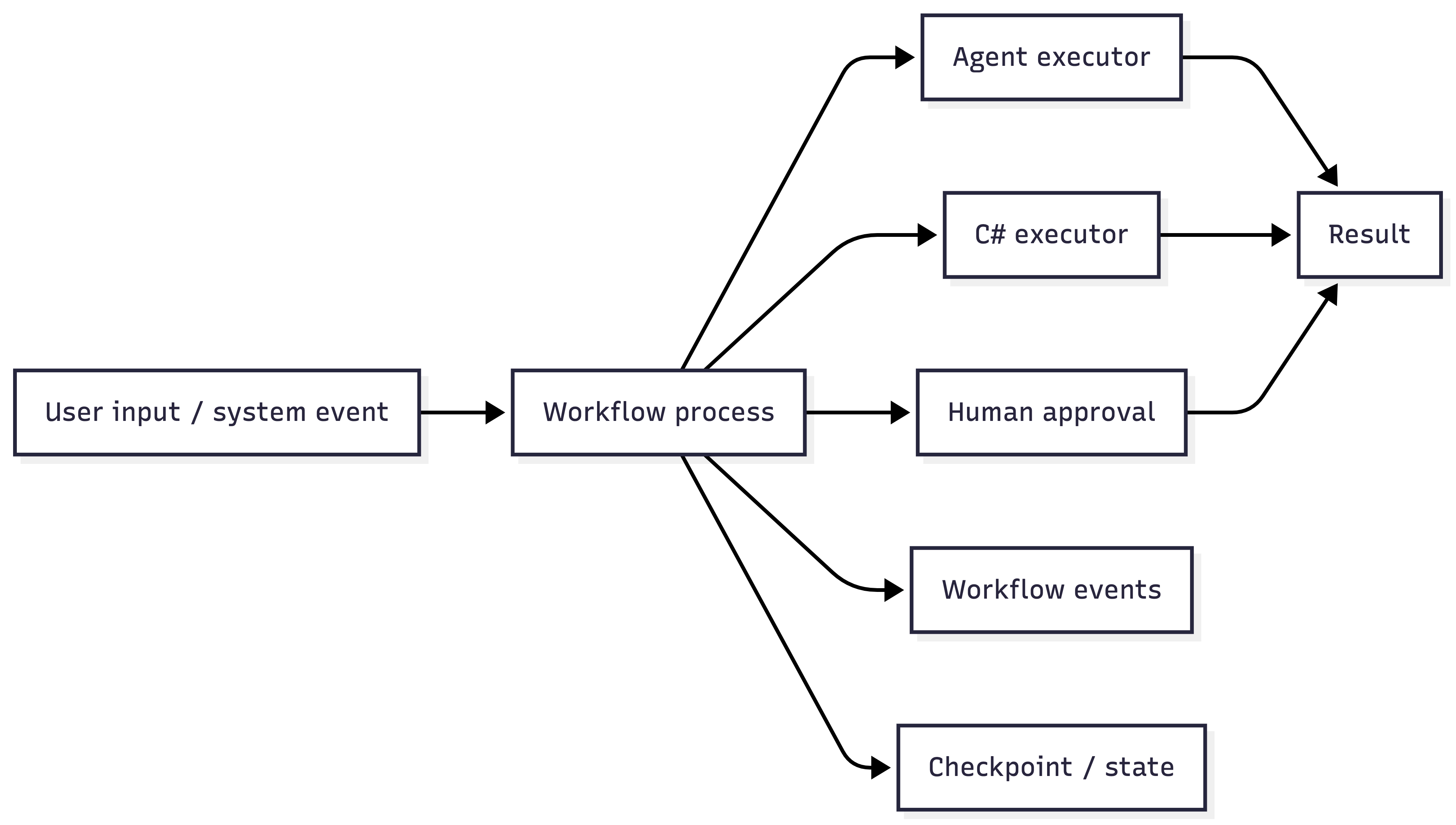
This is a different abstraction from a single agent call.
An agent decides dynamically what to do based on its instructions, tools, and conversation context. A workflow defines a process outside the model. Agents can be steps inside that process, but the process itself is controlled by the workflow.
That distinction matters.
If you are building a document review flow, a support escalation flow, or an approval process that may pause and resume later, the workflow is not just plumbing. It is part of the system. You may need to inspect it, persist it, test it, version it, and explain it to other people.
That is where a workflow engine becomes useful.
But there is a cost. A workflow graph introduces more setup code, more types, more event handling, and another layer between the application code and the thing that happens. For complex systems, that cost can be worth paying. For small flows, it can make the system harder to read.
Executors and Edges
The two basic building blocks are executors and edges.
An executor is a unit of work. It receives input, runs logic, and produces output or events.
An executor can wrap:
- deterministic C# code
- an agent call
- a tool call
- validation logic
- a transformation step
- a human approval request
- another piece of process logic
In agentic workflows, many executors are either agents or agent-driven steps. For example, one executor might call a document summarizer agent. Another executor might validate the generated summary. Another executor might wait for a human reviewer.
Edges define how data moves between executors. They are the connections in the graph.
An edge can represent:
- a direct connection from one step to the next
- conditional routing
- switch-like branching
- fan-out to multiple steps
- fan-in back into an aggregation step

This is where the workflow engine adds value. The control flow becomes visible in the workflow definition. You can look at the graph to see which steps can occur and which transitions are allowed.
Executors and edges are powerful because they turn orchestration into a model. But once orchestration becomes a model, you also pay the cost of maintaining that model.
Four Workflow-Related Patterns
Several workflow-related patterns show up quickly in real applications. Some are orchestration patterns. Others, such as human-in-the-loop, are process capabilities.
The important part is not the label. The important part is whether the process benefits from being modeled explicitly.
The examples are intentionally simplified. The point is the orchestration shape, not the exact API surface.
Sequential Workflows
A sequential workflow passes the output of one step to the next.
For example:
- One agent summarizes a legal document.
- Another agent translates the summary into French.
- A final step formats the result for a user.
As a workflow, this is a pipeline. Each step depends on the previous step. In a simple pipeline, the result of one executor can become the input for the next executor. In Agent Framework sequential agent orchestration, the next agent may also receive conversation context depending on how the orchestration is configured.
That is a valid workflow shape. But for two or three deterministic steps, normal C# may be clearer:
AgentResponse summary = await summarizerAgent.RunAsync(
    documentText,
    cancellationToken: cancellationToken);

AgentResponse translation = await translatorAgent.RunAsync(
    $"Translate this summary to French:\n\n{summary.Text}",
    cancellationToken: cancellationToken);

string formatted = formatter.Format(translation.Text);
There is nothing wrong with this. It is readable from top to bottom. It is easy to test. It is easy to debug.
The workflow version starts to pay off when the sequence itself matters operationally:
- You need to show progress for each step
- You need to retry or resume from a later step
- You need to audit which step produced which output
- You expect the pipeline to grow
- Non-trivial branches will appear between steps
Concurrent Workflows
A concurrent workflow sends the same input to multiple agents or steps at the same time.
For example, a legal document could be processed by three agents:
- One checks legal risk
- One checks spelling and grammar
- One extracts key obligations
This can reduce latency because the work happens in parallel. It also creates a useful structure when each branch has its own state, events, retry behavior, or result type.
But again, C# already has a good concurrency primitive:
Task<AgentResponse> riskTask = legalRiskAgent.RunAsync(
    documentText,
    cancellationToken: cancellationToken);

Task<AgentResponse> grammarTask = grammarAgent.RunAsync(
    documentText,
    cancellationToken: cancellationToken);

Task<AgentResponse> obligationsTask = obligationsAgent.RunAsync(
    documentText,
    cancellationToken: cancellationToken);

await Task.WhenAll(riskTask, grammarTask, obligationsTask);

AgentResponse risk = await riskTask;
AgentResponse grammar = await grammarTask;
AgentResponse obligations = await obligationsTask;

var result = new DocumentReviewResult(
    LegalRisk: risk.Text,
    GrammarNotes: grammar.Text,
    Obligations: obligations.Text);
For simple concurrent orchestration, Task.WhenAll is often easier to read and test than a workflow graph.
The operational concerns are the same either way:
- Parallel agent calls multiply token usage
- They can hit provider rate limits faster
- They increase cost
- They make partial failure handling more important
- Concurrency should be bounded and intentional
The workflow engine does not make those concerns disappear. It provides a structured way to model and observe concurrent branches when that structure matters.
Handoff Workflows
A handoff workflow allows one agent or step to decide which other agent should continue the task.
For example:
- An intent agent receives a user request.
- It decides whether the task belongs to a movie expert, music expert, legal expert, or support agent.
- The workflow controls which handoffs are allowed.
- The selected agent continues the process.
This is useful when the route can continue over multiple steps and allowed transitions matter. The workflow can make it clear that the legal expert may hand off to compliance, but not directly to billing. Or that support can escalate to engineering, but only after collecting certain information.
For simple routing, I would usually not start here. The pattern from the manual routing article is often enough:
AgentResponse<IntentResult> intentResponse =
    await intentAgent.RunAsync<IntentResult>(
        $"""
        Classify the user's request.

        User request:
        {userMessage}
        """,
        cancellationToken: cancellationToken);

IntentResult route = intentResponse.Result;

string answer = route.Intent switch
{
    UserIntent.Movies => (await movieAgent.RunAsync(userMessage, cancellationToken: cancellationToken)).Text,
    UserIntent.Music => (await musicAgent.RunAsync(userMessage, cancellationToken: cancellationToken)).Text,
    UserIntent.Legal => (await legalAgent.RunAsync(userMessage, cancellationToken: cancellationToken)).Text,
    _ => "I can help with movies, music, or legal questions."
};
This keeps routing explicit in application code. The classifier returns structured output. The application validates it. The switch expression owns the route.
That is boring in the best way.
Handoff workflows help when routing is no longer just a single switch:
- Allowed transitions are part of the domain
- Agents may hand off repeatedly
- The path needs to be inspected later
- Intermediate state must survive between handoffs
- Handoffs need events, checkpoints, or human approval
Human-in-the-Loop Workflows
Human-in-the-loop is less about routing and more about process state. It allows the system to pause and wait for human input.
For example:
- An agent drafts an answer.
- The workflow pauses for human approval.
- A human edits or approves the answer.
- The workflow continues with publishing or sending the result.
This is one of the strongest reasons to use a workflow engine. The pause is not a UI detail. It is part of the process.
Still, not every user interaction needs a workflow.
For a local chat UI, this may be enough:
AgentResponse draft = await agent.RunAsync(
    userMessage,
    cancellationToken: cancellationToken);

ApprovalDecision decision = await approvalUi.RequestApprovalAsync(
    draft.Text,
    cancellationToken);

if (!decision.Approved)
{
    return "Draft rejected.";
}

await publisher.PublishAsync(decision.EditedText, cancellationToken);
That is simple. The user is present. The interaction is immediate. The state belongs naturally in the UI or controller flow.
Workflows become useful when the human interaction is part of a long-running business process:
- approval chains
- compliance checks
- ticket escalation
- delayed review
- multi-day processes
- persisted state
- audit requirements
If the process may pause today and resume tomorrow, a workflow engine is a much better fit than pretending everything still lives inside one request handler.
The Guitar Order Example
Let’s make the trade-off concrete.
A customer orders a guitar from an online music store.
The system should:
- parse the customer’s guitar order
- check inventory
- decide whether the guitar can be reserved
- return either a confirmation, an alternative recommendation, or a human review request
The agents are not the hard part. The design decision is where orchestration belongs.
The Workflow-Heavy Version
In a workflow-heavy design, you might model the process like this:
GuitarOrderParserExecutorInventoryCheckExecutorReserveInventoryExecutorAlternativeRecommendationExecutorHumanReviewExecutorOrderConfirmationExecutor- an edge from parsing to inventory
- a conditional edge from inventory to alternative recommendations
- a conditional edge from inventory to reservation
- a conditional edge from reservation to human review
- a conditional edge from reservation to confirmation
- an edge from approved human review to confirmation
- events emitted when parsing, inventory check, reservation, review, and final decision complete
Conceptually, the graph looks like this:
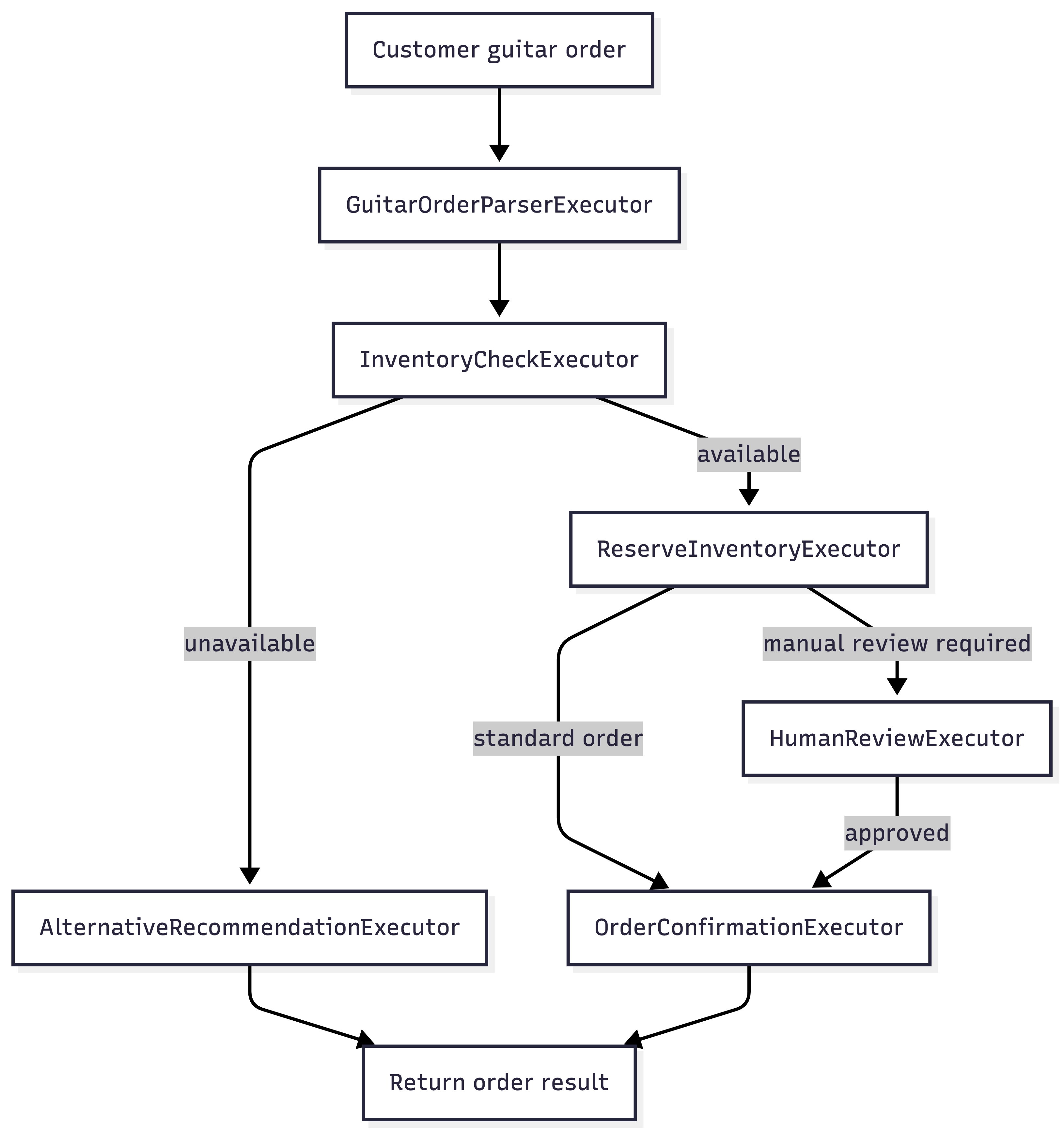
This can be a good design.
If the guitar order process is part of a larger business process, the workflow graph may be exactly what you want. Maybe high-value guitars require manual review. Maybe custom instruments need setup confirmation. Maybe inventory reservation and payment authorization happen asynchronously. Maybe fulfillment is delayed. Maybe customer support needs to inspect where the order stopped.
In that world, the workflow is not over-engineering. It is the process model.
The Normal C# Version
For the simple version, I would probably write something like this:
public async Task<GuitarOrderResult> HandleAsync(
    string userMessage,
    CancellationToken cancellationToken)
{
    AgentResponse<GuitarOrder> parsed =
        await guitarOrderParserAgent.RunAsync<GuitarOrder>(
            userMessage,
            cancellationToken: cancellationToken);

    InventoryResult inventory =
        await inventoryService.CheckAsync(parsed.Result, cancellationToken);

    if (!inventory.IsInStock)
    {
        AlternativeProduct? alternative =
            await recommendationService.FindAlternativeAsync(
                parsed.Result,
                cancellationToken);

        return GuitarOrderResult.AlternativeRecommendation(
            parsed.Result,
            alternative);
    }

    Reservation reservation =
        await inventoryService.ReserveAsync(parsed.Result, cancellationToken);

    if (reservation.RequiresManualReview)
    {
        return GuitarOrderResult.HumanReviewRequired(
            parsed.Result,
            reservation);
    }

    return GuitarOrderResult.Confirmed(
        parsed.Result,
        reservation);
}
In the simple C# version, the method can simply return a HumanReviewRequired result and let the surrounding application handle the next step.
In the workflow version, the process itself could pause, persist its state, wait for the review, and continue later.
Every developer can follow this flow from top to bottom. There is no workflow setup to inspect. There are no edges to mentally resolve. The control flow is not hidden behind the workflow definition.
For this simple case, the C# version may be easier to understand six months later.
The same agents can be used in both designs. The design decision is not whether agents are useful. The design decision is where orchestration belongs.
That is the trap with workflow engines. They can make complex processes easier to inspect, but they can also make simple processes harder to understand.
For small flows, workflow graphs can introduce more setup code, more indirection, more event handling, and more distance between cause and effect.
Ceremony is not architecture.
Decision Matrix: Workflow Engine vs. Normal C#
Use this as a quick filter before reaching for a workflow graph.
| Scenario | Start with C# when… | Use workflows when… |
|---|---|---|
| Sequential chain | The flow has two or three deterministic steps | Steps need progress events, checkpoints, retries, or resumption |
| Concurrent calls | Task.WhenAll is enough | Branches need independent state, observability, or fan-in logic |
| Routing / handoff | Structured output + switch is clear | Allowed transitions are part of the domain |
| Human input | The user is present in the UI | Approval is delayed, auditable, or long-running |
The table is intentionally biased toward starting simple. A workflow engine should not be used because orchestration exists. It should be used because modeling orchestration improves the system.
When I Would Use Workflows
I reach for workflows when the orchestration is important enough to become a first-class part of the system.
That usually means one or more of these are true:
- the process has many steps and branches
- the process itself needs to be visible
- the workflow needs to pause and resume
- the state must be checkpointed or persisted
- humans approve or modify intermediate results
- the process may run for minutes, hours, or days
- the orchestration path matters for auditing
- teams need a shared model of the process
- the graph is easier to reason about than scattered application code
If the process is part of the product behavior, model it deliberately. If users, operators, or auditors care about the process, hiding it in a method call may not be enough.
When I Would Not Use Workflows
I avoid workflows when the graph adds more code than it removes.
That is often the case when:
- there are only two or three steps
- the process is linear
- routing is just a simple switch
- parallelism is just
Task.WhenAll - user input belongs naturally in the UI flow
- the workflow graph adds more setup than clarity
- debugging the workflow is harder than reading the code
If normal C# makes the flow obvious, testable, and maintainable, that is not a workaround. That is good engineering.
External Workflow Engines
Microsoft Agent Framework workflows are useful inside an agent application. They do not automatically replace every existing workflow platform.
If the workflow is a company-level business process with many integrations, approvals, retries, timers, dashboards, and non-developer stakeholders, the agent framework should probably not become the central enterprise workflow platform.
Examples include:
- Azure Logic Apps
- Durable Functions
- n8n
- Make
In those systems, agents can be exposed as API steps or services. The external workflow engine owns the broader business process. The agent application owns the agent behavior.
Use the right workflow engine at the right level.
A Practical Rule of Thumb
Start with C#. Move to workflows when the process needs to outlive the method call.
More specifically:
- If the orchestration is local, short-lived, and deterministic, keep it in code.
- If the orchestration is long-running, inspectable, resumable, and operationally relevant, model it as a workflow.
Another way to say it:
Use code when you need control flow. Use workflows when control flow becomes product behavior.
Conclusion
The workflow engine is a powerful part of Microsoft Agent Framework. It is a good fit when the process itself has architectural weight: state, checkpoints, events, approvals, resumption, and operational visibility.
It is not the default answer to every multi-agent design.
Simple orchestration still often belongs in normal C# code: method calls, switch statements, loops, Task.WhenAll, validation logic, and explicit application services.
The goal is not to use the most advanced abstraction. The goal is to make the system easier to understand, operate, and change.
We can now orchestrate agents, route tasks, expose agents as tools, and decide when workflows are worth the complexity. Next, the series moves to knowledge: how agents answer from documents, databases, PDFs, and internal systems through retrieval-augmented generation.