Deep Dive: Microsoft Agent Framework
Part 11 of 19
Browse articles
Table of Contents
In the previous article, we looked at manual multi-agent routing. A small intent agent classified the request. Then normal C# decided which specialist agent should run.
That pattern is useful when your application should retain control over the route. But there is another pattern that is worth knowing: exposing an agent as a tool.
Instead of routing from C#, you give a coordinator agent access to other agents as function tools. The coordinator can then decide when to delegate work to a focused inner agent.
This is not a magic cost reducer. It is not a replacement for workflows. It is a lightweight composition pattern for cases where one agent has become too broad, but a full workflow graph would be too much.
The Problem with One Tool-Heavy Agent
Let’s first discuss why a single, tool-heavy agent is a problem. Adding tools to an agent is easy. That is also why agents tend to grow too quickly.
A first version might only answer questions. Then it gets a few string utilities. Then some number tools. Then a documentation search tool. Then a ticketing tool. Then a deployment helper.
At some point, every request carries too much baggage. The model receives:
- broad instructions
- many tool namesor small agents
- many tool descriptions
- parameter schemas for tools it does not need
- rules for domains that are irrelevant to the current request
This creates the same issue we saw in manual routing. The agent has more context to process, more tools to choose from, and more ways to choose the wrong behavior.
For small agents, this does not matter much. For agents with many detailed tools, the overhead becomes visible quickly because tool definitions are part of the model context.
Agents as Tools
Agent Framework lets you convert an AIAgent into a function tool using AsAIFunction().
That tool can then be passed to another agent.
This assumes you are using an agent type that supports function tools. In practice, check agent and provider support before designing around this pattern.
The outer agent sees the inner agent like any other tool. The inner agent still has its own instructions, tools, model calls, and behavior.
Conceptually, the flow looks like this:

The important part is isolation. The coordinator does not need to know every low-level tool behind every specialist agent. It only needs to know which specialist agents are available and what each one is good at.
A Small Example
Imagine a simple assistant with two specialist areas:
- string transformations
- numeric calculations
You could put all tools on one agent. For a small demo, that is fine. But the structure becomes clearer when each specialist owns its own tools.
using System.ComponentModel;
using Microsoft.Agents.AI;
using Microsoft.Extensions.AI;

[Description("Converts text to uppercase.")]
static string ToUppercase(
    [Description("The text to convert.")] string text)
{
    return text.ToUpperInvariant();
}

[Description("Reverses text.")]
static string ReverseText(
    [Description("The text to reverse.")] string text)
{
    return new string(text.Reverse().ToArray());
}

[Description("Multiplies two numbers.")]
static double Multiply(
    [Description("The first number.")] double left,
    [Description("The second number.")] double right)
{
    return left * right;
}
Now create the inner agents.
AIAgent stringAgent = chatClient.AsAIAgent(
    name: "string-agent",
    description: "Handles string transformations such as uppercase and reverse text.",
    instructions: """
    You transform strings by using the provided tools.
    Keep the answer short and return the transformed value clearly.
    """,
    tools:
    [
        AIFunctionFactory.Create(ToUppercase),
        AIFunctionFactory.Create(ReverseText)
    ]);

AIAgent numberAgent = chatClient.AsAIAgent(
    name: "number-agent",
    description: "Handles small deterministic numeric calculations.",
    instructions: """
    You perform numeric calculations by using the provided tools.
    Keep the answer short and include the calculated value.
    """,
    tools:
    [
        AIFunctionFactory.Create(Multiply)
    ]);
The name and description matter because they become part of the coordinator model’s routing surface once the agents are exposed as tools.
A vague description gives the coordinator too little information to choose the right specialist reliably.
Now expose those agents as tools to the coordinator.
AIAgent coordinatorAgent = chatClient.AsAIAgent(
    name: "coordinator-agent",
    instructions: """
    You decide whether a request should be handled directly or delegated.

    Use the string agent for text transformation tasks.
    Use the number agent for deterministic numeric calculations.

    If no specialist agent fits, answer briefly without inventing tool results.
    """,
    tools:
    [
        stringAgent.AsAIFunction(),
        numberAgent.AsAIFunction()
    ]);

AgentResponse response = await coordinatorAgent.RunAsync(
    "Uppercase 'hello world' and multiply 12 by 4.");
The coordinator receives two tool options:
- Call the string agent
- Call the number agent
It does not receive the raw schemas for ToUppercase, ReverseText, and Multiply as direct tools.
Those belong to the specialist agents.
What Actually Saves Tokens
The token benefit comes from narrowing the visible tool surface.
Without delegation, one large agent receives every tool schema on calls to that agent:
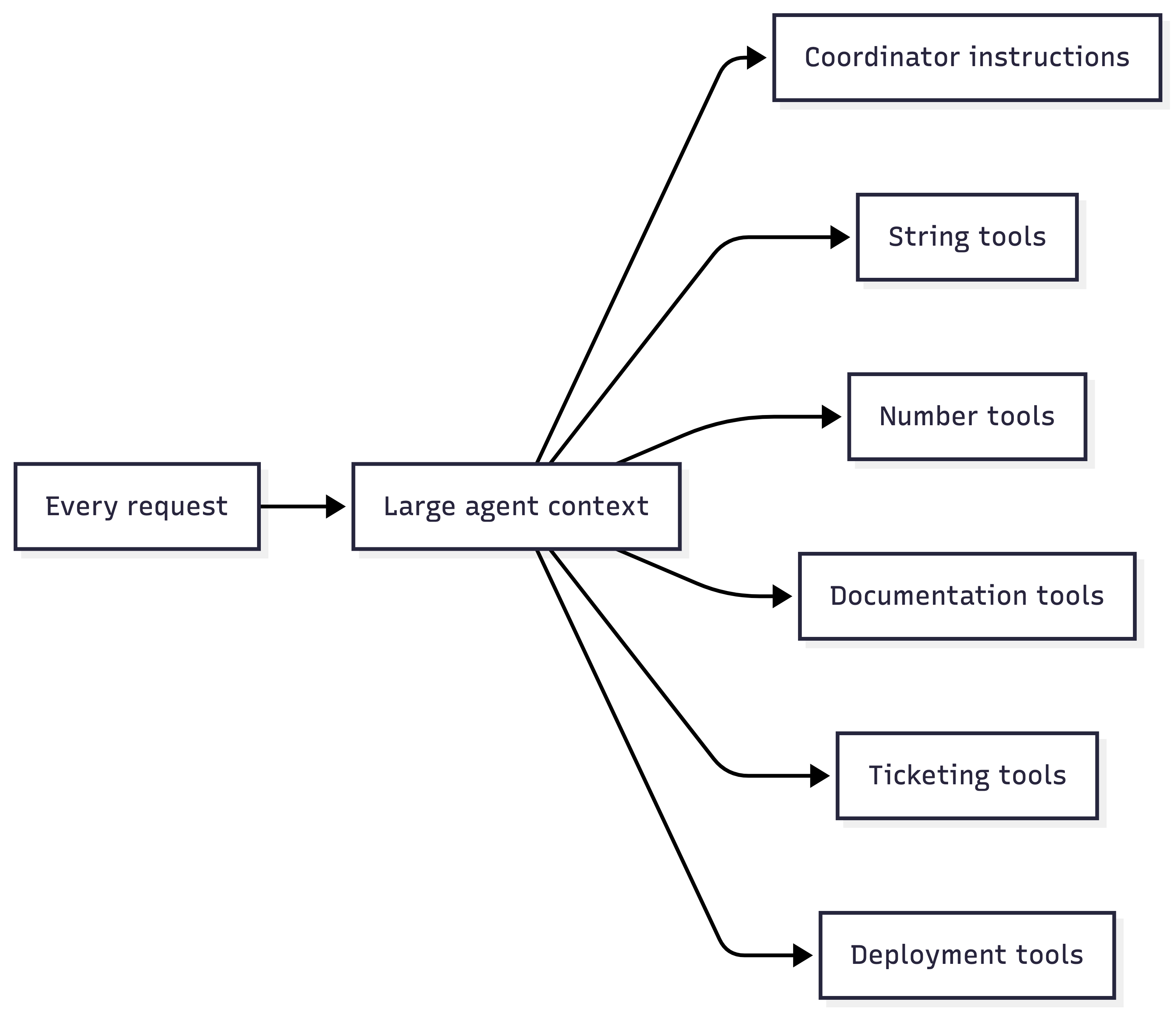
With agents as tools, the coordinator sees a smaller set of higher-level tools:

That can reduce input tokens for the coordinator call. But delegation also adds extra agent invocations.
If the coordinator calls one inner agent, you pay for the coordinator call and the inner agent call. If it calls three inner agents, you pay for all of them.
This pattern pays off when:
- Most requests only need one specialist area
- Inner agents have many tools that should not be visible all the time
- The coordinator can use a smaller model than the specialists
- Specialist agents can stay focused and short
It may not pay off when:
- Every request needs most of the inner agents anyway
- The tool lists are already small
- The coordinator needs long context just to decide what to do
- Latency matters more than token cost
Measure it with your prompts, tools, models, and traffic shape.
Delegation Is Model-Driven
This is the main difference from the previous article.
With manual routing, the application decides:

With agents as tools, the coordinator model decides:

That makes agents as tools more flexible. The coordinator can decide to call one specialist, multiple specialists, or none. It can also combine results before answering the user.
But it is less explicit than a C# switch. The model may skip a useful specialist. It may call the wrong one. It may delegate when a direct answer would have been enough.
Good agent descriptions help, but they do not make delegation deterministic.
Use manual routing when you need predictable application-owned control. Use agents as tools when the coordinator should reason about whether delegation is useful.
Context Does Not Automatically Transfer
An inner agent is not just a continuation of the outer agent. It runs as a tool call. That means the inner agent has its own:
- Instructions
- Tools
- Model invocation
- Context providers
- Session behavior
It does not automatically inherit the full outer conversation history or every piece of outer context. The coordinator must pass the relevant task information through the tool call.
If you pass a shared AgentSession to AsAIFunction(), treat it carefully.
The resulting function is stateful, so reusing it concurrently across conversations can create unpredictable behavior.
This is a good boundary, but it can surprise you. Let’s think about the coffee agent from my previous examples.
For example, if the user said their preferred coffee ratio five turns ago, the inner coffee agent may not know that unless the coordinator passes it in or the inner agent can load it through its own memory/context setup.
So, a practical rule is :
Do not assume shared context. Deliberately pass the necessary task context, or give the inner agent its own context provider.
Keep Inner Agents Focused
The point of this pattern is not to hide complexity inside another agent. The point is to create a smaller, clearer capability boundary.
A useful inner agent should have:
- a narrow responsibility
- a clear name
- a concrete description
- only the tools it needs
- short instructions
- predictable output expectations
If the inner agent becomes another general-purpose assistant, you have only moved the problem one level down.
For example, string-agent is a useful boundary.
It transforms strings.
It has string tools.
It does not need documentation search, ticket creation, or deployment access.
Keep in mind:
operations-agent-that-can-do-everything is not a useful boundary.
It is just the original overloaded agent with a different name.
Watch the Side Effects
An agent tool can hide several lower-level tool calls behind one coordinator-visible call. That is useful for composition. It also means you need observability.
The outer agent receives the inner agent’s result. It should not be your only audit surface. If the inner agent can call tools, log those tool calls where they happen. Use tracing or middleware so you can inspect:
- which inner agent was called
- what input it received
- which tools it called
- whether approval was required
- what result it returned
- how long each step took
Note: I will dive into observability in a later post, but for now I just want to mention that Aspire Dashboard includes a GenAI visualizer that is really helpful when debugging multi-agent setups. For background, see the OpenTelemetry article GenAI observability with OpenTelemetry and Aspire Dashboard.
The same safety rule from local tools still applies:
If an inner agent can spend money, change data, send messages, or trigger deployments, do not rely on the coordinator prompt as the safety boundary. Put approval, authorization, validation, and logging behind the actual tool that performs the action.
The inner agent is a composition boundary. It is not a security boundary by itself.
Agents as Tools vs. Workflows
Agents as tools are useful for lightweight delegation. They are not the same as workflows.
Use agents as tools when the coordinator can decide what to call and the task can complete in normal tool-calling flow.
Use a workflow when the orchestration itself needs to be explicit. For example:
- fixed execution order
- checkpoints
- resumability
- human approval between steps
- typed edges between stages
- long-running processes
- clearer operational visibility
A coordinator agent can be enough for:
- Read the user request.
- Call the right specialist.
- Combine the result.
- Answer.
A workflow is a better fit when the process itself is the product. For example, triage a support case, create a remediation plan, ask for approval, execute a change, and persist the result.
When to Use Agents as Tools
Use agents as tools when:
- one agent is accumulating too many unrelated tools
- specialist agents can own clear domains
- the coordinator should decide whether delegation is needed
- different specialists should use different tools, prompts, or models
- the inner task can be represented as a tool call and final result
- you can observe and test the delegation path
Do not use agents as tools when:
- a simple C# function is enough
- a C# switch gives better control
- every request needs every specialist anyway
- the inner agent needs hidden context that cannot be passed reliably
- the side effects are too risky without explicit approval
- the process needs workflow-level checkpoints and state
This pattern is best treated as a pragmatic middle step. It sits between manual routing and full workflow orchestration.
Conclusion
Agents as tools let you compose focused agents without giving one agent every raw tool. The coordinator sees a smaller set of specialist capabilities. Each inner agent keeps its own instructions and tools.
That can improve focus by reducing the tool surface visible to the coordinator. But it also adds model-driven delegation, extra invocations, context isolation, and observability requirements.
Use this pattern when delegation should be flexible and specialist boundaries are clear. Use manual routing when application code should decide. Use workflows when the orchestration needs explicit state, checkpoints, and control.
Next, we will move from lightweight delegation to Agent Framework workflows: when the workflow engine is worth using, and when normal C# is still the cleaner option.