Table of Contents
This is the start of my deep dive series into Microsoft Agent Framework.
It is the part of Microsoft’s current .NET AI stack that is important when you move beyond raw model calls and start dealing with agents, sessions, tools, MCP integration, and workflows. To understand where it fits, we also need to look at the layers beneath it.
It builds on Microsoft.Extensions.AI, which provides the common primitives for model interaction in .NET. And with its general availability, Agent Framework is best understood as the successor for new agent-oriented systems, while Semantic Kernel still matters for existing codebases and migration paths.
So before getting into code, it helps to answer a more basic question: where exactly does Agent Framework fit and when is it the right abstraction?
This opening article maps Agent Framework into the current .NET AI stack. It looks at what it builds on, where it replaces older patterns and where standard C# or lower-level abstractions are still the better choice.
The Stack
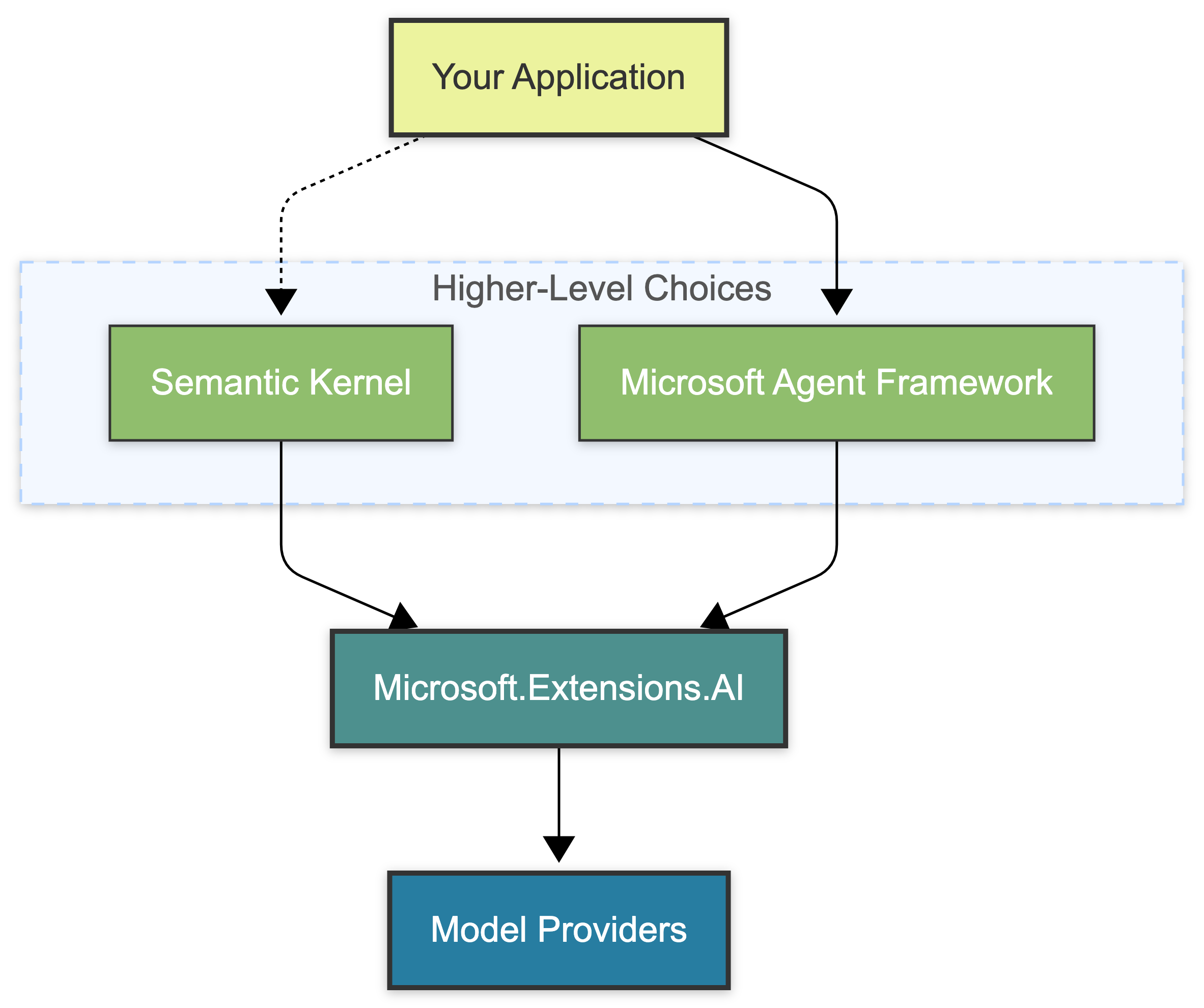
| Layer | Best For | Key Abstraction |
|---|---|---|
| Microsoft.Extensions.AI | Provider-neutral model access, middleware, and core AI building blocks | IChatClient, IEmbeddingGenerator |
| Semantic Kernel | Existing plugin-heavy systems and older orchestration code | Kernel |
| Microsoft Agent Framework | Agents, sessions, MCP, workflows, and higher-level orchestration | AIAgent, Workflow |
1. Microsoft.Extensions.AI Is the Foundation
Microsoft.Extensions.AI is the shared foundation for model interaction in modern .NET applications.
It does not try to be a full agent runtime. It does not give you a built-in session model or a workflow engine. What you get is a consistent abstraction layer for the core pieces:
- Provider-agnostic chat via
IChatClient - Embeddings via
IEmbeddingGenerator - Middleware-based composition
- Tool invocation
- Telemetry and caching hooks
This makes it the right layer when you want clean access to models without committing your application logic to a specific provider or a heavier runtime model.
Once you need agents, session-aware conversations, persistent context or workflow semantics, Microsoft Agent Framework starts to make more sense.
2. Microsoft Agent Framework Is the Runtime Layer
Microsoft Agent Framework sits above Microsoft.Extensions.AI and adds the runtime concepts that the lower layer intentionally does not provide on its own: agents, sessions, context, workflows, and integrations such as MCP or A2A.
It builds on shared chat clients, so it no longer depends on framework-specific provider connectors. This gives you a cleaner programming model. But keep in mind that it does not remove provider differences. Model behavior, tool support, structured output, and other advanced capabilities still vary by provider and model family.
This is the real role of Agent Framework. It is not a replacement for Microsoft.Extensions.AI. It is the layer you move to when direct model access is no longer enough and you need a runtime that can coordinate state, tools, and multi-step execution.
2.1 Context Providers and History Are Different Things
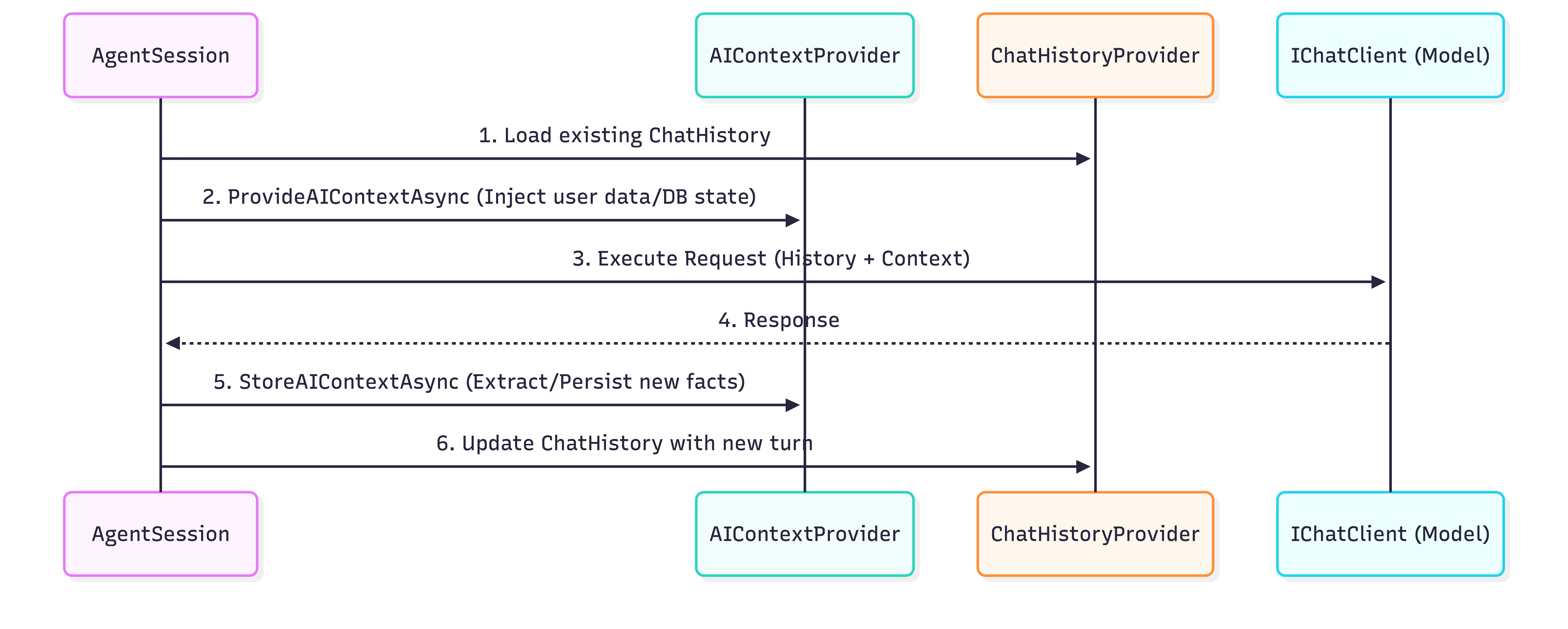
AIContextProvider is one of the central extension points in Agent Framework.
It exists to add or capture context during an agent invocation.
In the current API surface, context providers run through an invocation lifecycle and can contribute information before a run and process results afterward.
This is not the same as a durable conversation history.
A context provider shapes the current run. A history provider stores and reloads messages across runs. Microsoft’s current docs also use context providers for memory and RAG-style augmentation, which fits that separation well: one component enriches the invocation, another persists the conversation itself.
So in practice, that usually looks like this:
- Before a run: load relevant user data, retrieved documents, or application state and attach it to the invocation.
- After a run: extract useful information and persist it back into your own storage or memory system.
- Separately: use a chat history provider when you need durable message history across turns.
A good custom use case here is dynamic tool selection. Instead of giving every tool to every agent all the time, you can decide at runtime which tools belong in the current invocation. That keeps the tool surface narrower and easier to reason about. The same rule applies outside Agent Framework: keep agent tools narrow and boring so each tool has a clear contract and a limited blast radius.
2.2 MCP Fits Naturally Here, but It Is Still a Trust Boundary

MCP is not exclusive to Agent Framework. But Agent Framework already has a runtime model for agents, tools, and sessions. So bringing MCP servers into that model is much cleaner than wiring everything together manually.
Keep in mind though, that convenience does not remove the trust boundary.
Microsoft’s own overview is explicit here: if you connect third-party servers, agents, code, or non-Microsoft systems, you are responsible for permissions, testing, safety mitigations, costs, and data handling. This is exactly the kind of mindset you want for MCP as well. Treat it as an integration surface, not as implicitly trusted infrastructure.
2.3 Built-In Workflows Are Strong, but Not Mandatory

When talking about Agent Framework, the addition of workflows is worth mentioning, too. You get graph-based execution, explicit routing, checkpointing, strong typing and support for human-in-the-loop scenarios. When a workflow can cause side effects, use approval at the side-effect boundary rather than for every tool call. The framework also ships with built-in multi-agent orchestration patterns such as sequential, concurrent and hand-off flows.
You should be aware that not every multi-step process should become a workflow.
A practical split would look like this:
- Use standard C# for simple sequential or parallel calls
- Use a single agent when the task is open-ended and tool-using
- Use workflows when you need explicit orchestration, resumability, checkpoints, or human approval
2.4 The Broader Framework Surface
Despite its name, Microsoft Agent Framework includes more than just agents. It also includes declarative agents, A2A, AG-UI, MCP integration, session state, middleware, and typed workflow execution across .NET and Python.
And Microsoft describes it as the direct successor to Semantic Kernel and AutoGen. It is not just a new agent abstraction. It is a framework that covers execution, state, integration, and orchestration for agent-oriented systems.
3. Where Semantic Kernel Fits Now
If you are starting a new agent-oriented project today, Microsoft Agent Framework is the primary choice.
This does not mean that Semantic Kernel suddenly has become irrelevant. Semantic Kernel was important early on because it gave .NET developers a workable orchestration model before the current runtime layer existed. It is still supported, many teams still run production code on it and for existing SK plugin-heavy systems the right move is often to keep it until there is a real reason to migrate.
(Note on RAG: If you need vector search and Retrieval Augmented Generation, your primary abstraction is now Microsoft.Extensions.VectorData. While many provider packages still carry Microsoft.SemanticKernel.Connectors.* names, this reflects package lineage rather than a strict dependency on the Semantic Kernel runtime.)
Which Layer Should You Use?
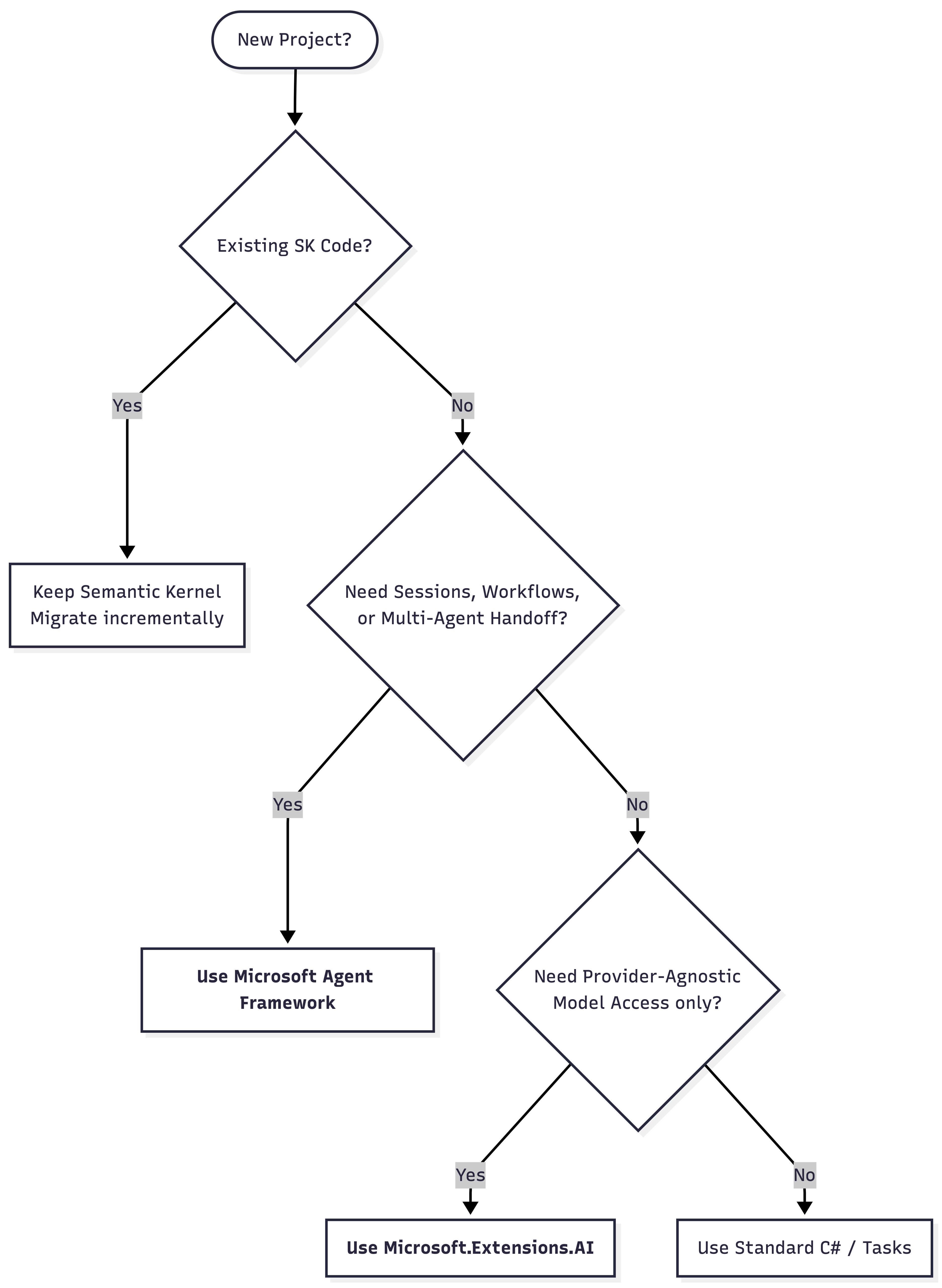
Use Microsoft.Extensions.AI when:
- You want provider-agnostic model access.
- You need chat, embeddings, tools, middleware, or telemetry without a full agent runtime.
Use Agent Framework when:
- The task is open-ended, conversational, or requires tool use and session awareness.
- You need MCP to feel native inside the runtime.
- You require formal workflows, routing, checkpoints, or human approval.
Keep Semantic Kernel when:
- You are maintaining existing SK plugins or production code.
- The migration cost isn’t justified yet.
Standard software engineering rules still apply here. If a normal C# function solves the problem, use it. Not every AI feature requires an agent, and not every agent requires a workflow.
Teaser
In the next article, I will shift my focus from architecture to code, building a minimal agent from scratch and wiring it up to a real model.